Is your data project running without a plan?
The Flow7 framework checklist for data migrations, reporting, automation and AI
I use my own structured seven-step framework — Flow7 — across all my data project work. Whether the project is a CRM migration, a reporting build, a workflow automation, a system backup or preparing data for AI, the same core steps apply: know your sources, assess the data, build your master data set (one source of truth!), define the target, map the data, test and then when ready... go live.
This page sets out the framework so you can use it on your own projects. If you reach a point where you need help, contact me.
Flow7 applies across the four most common data project types in small and medium-sized businesses. It applies for small or large projects. The steps are the same — the questions at each step are tailored to the project type. The same methods apply.
Data Migration
Full Migrations or Data Loads
Moving from one CRM, ERP or platform to another. Flow7 structures the source audit, data cleansing, field mapping, testing and cutover in a sequence that reduces risk and avoids the most common causes of migration failure.
Reporting & BI
Any BI System or Report Format
Building dashboards, reports and scheduled exports that people actually trust and use. Flow7 applied to reporting means defining the questions first, then working back to the data sources and structures needed to answer them.
Automations
Workflows & Integrations
Designing and building automations that run reliably without manual intervention. Flow7 brings the same structured approach to automation scoping, build, testing and monitoring as it does to migrations.
AI Builds
Agentic, Generative and Automated Whether you are building an agentic workflow, a generative AI integration or an AI-powered automation, Flow7 gives you the structured foundation to plan sources, assess data quality, define outputs and test properly before go live. The same seven steps apply regardless of the AI approach.
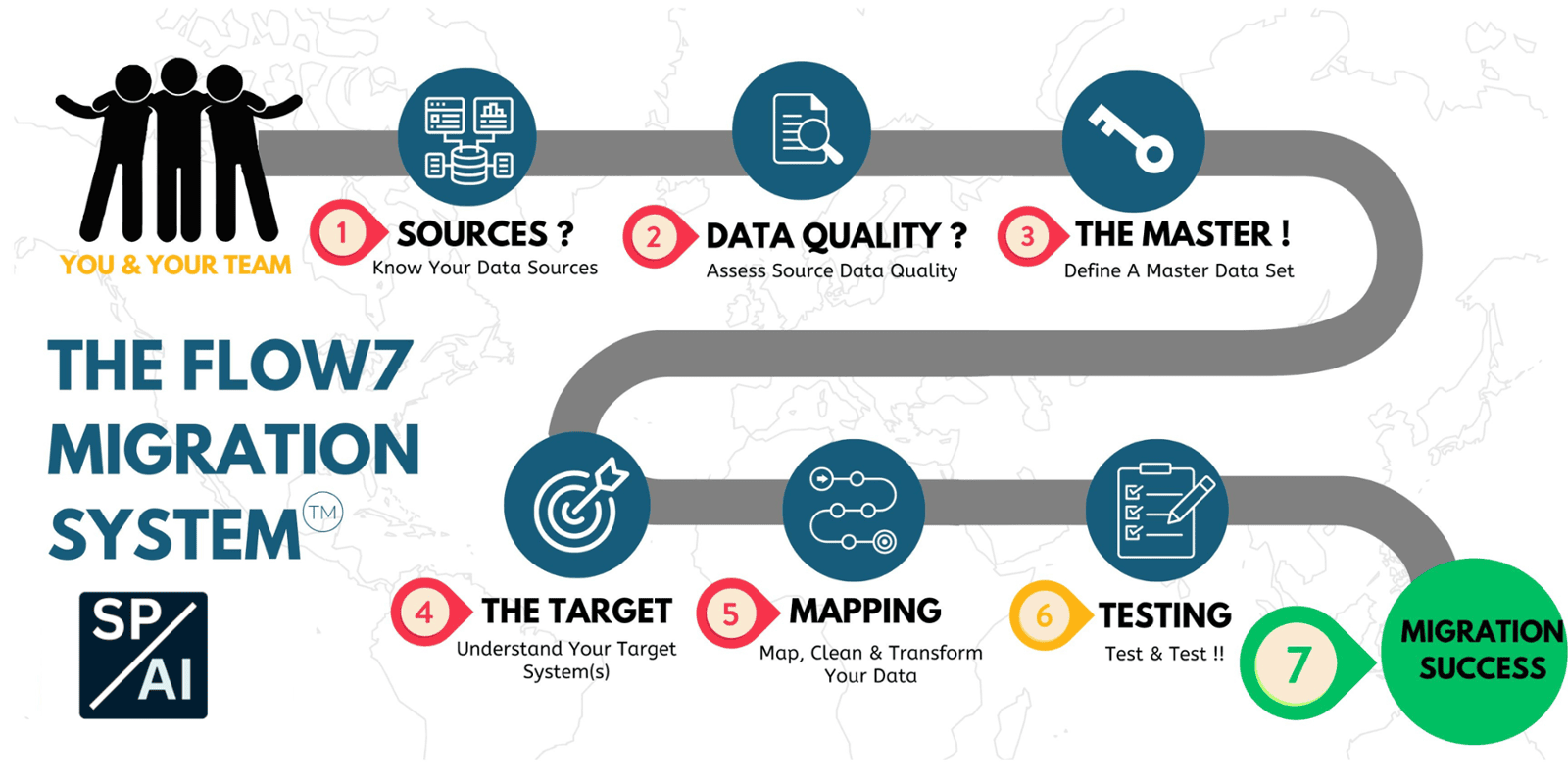
How Do I Plan a Data Project?
Data quality problems do not fix themselves in transit. Duplicates, blank mandatory fields, inconsistent formatting, orphaned records and values that made sense years ago but no longer reflect reality will all follow your data into the new environment unless they are resolved first. Step 2 is about honest assessment — not just whether data exists, but whether it is fit for the purpose for the new system, report or AI process that requires it. Quantify the amount of data, record counts and size. Check and document privacy and other compliance of the data.
Once your sources are assessed and quality issues are understood, you need to bring everything together into a single reference point — the master data set. This means naming the specific files and locations that will form your one source of truth, assigning ownership, and establishing a change control process so nothing gets added or altered without it being recorded. Any field or record that is to be moved or used must be in the master set. If new sources emerge later, the master needs updating before work continues.Your master set ideally is pulled together into one area, but it can be from mulitple defined sources that are recorded as forming the master data for your project. This needs to be backed up - regularly during your project!
What does the finished state look like? In a migration, this is the target system(s) and its field structure. In a reporting project, it is the questions the reports need to answer that are output in a readable report or dashboard. In an automation, it is the outcome the workflow is designed to produce. In an AI project, it is the system or process that will consume the AI output, be it a chat interphase or agentic process. Defining and investigating the target before building prevents the common problem of building something technically correct that does not match what the business actually needs or users will interact with. Business process is closely aligned with the target but
Data rarely lives in one place or serves one purpose. Step 5 is about the connections — between source and target, between systems, between processes. In a migration this is field mapping. In a reporting project it is the joins and relationships between data sets. In an automation it is the trigger and action logic. In an AI project it is the data pipeline feeding the model. Getting the mapping right before testing saves significant rework. This process can be iterative, as are the steps above. You may source data, map it to your target then in testing find a core missing element, so you would revolve back to your source, add the data, update the master, then retest.
You can never test too much! Testing is not optional and it is not just a technical check, its process, its people, its business outcomes. It covers whether the data arrived or is output correctly, whether the outputs match expectations, whether edge cases are handled, and whether the result is something the business or its users can actually really use and trust. A migration that passes a technical validation but produces reports nobody believes has not succeeded. Build testing into the plan from the start, not as an afterthought at the end.
Going live is not the end of the project — it is the beginning of the next phase. A structured go-live covers cutover timing, fallback options if something goes wrong, user communication, and the first-week checks that confirm everything is running as expected. For migrations, this includes decommissioning the source system at the right point. For automations and AI projects, it includes monitoring to catch issues , missed or not encountered in testing (You can never test too much!) before they cause problems.
Is your business ready for a data project?
Free to use Data Migration Readiness Assessment
FAQ's Related to Data Projects
How Do I Plan A Data Migration Without Losing Data?
The most reliable approach is to work through the project in stages rather than attempting a single large transfer. Start with a complete audit of your source data — what exists, what condition it is in, and what the target system requires. Resolve data quality issues before migration rather than planning to fix them afterwards. Map every field explicitly, test with a representative sample before the full migration, and have a clear fallback plan if the go-live does not go as expected. The most common cause of data loss in migrations is not technical failure — it is inadequate preparation before the migration task is started.
What Data Quality Checks Should I Do Before A Crm or Erp Migration?
The key checks are: duplicates across key record types such as contacts, companies and products; mandatory fields that are blank or populated with placeholder values; inconsistent formatting in fields such as telephone numbers, postcodes and dates; records that are no longer relevant and should be archived or deleted rather than migrated; and relationship integrity — whether related records such as contacts linked to accounts or line items linked to orders are correctly associated. Running these checks before migration prevents the problems from being amplified in the new system.
Why Do Data Projects Go Wrong?
The most common causes are starting the build before the target is clearly defined, underestimating the time required for each stage, treating testing as a final step rather than building it into the plan throughout, and failing to get business sign-off on what success looks like before work starts. Technical problems do occur but they are rarely the primary cause of a data project failing to deliver what was expected.
How Do I Know If My Data Is Ready For Ai?
Data that is ready for AI is complete, consistent and relevant to the problem the AI is being asked to solve. In practice, that means checking for significant gaps in key fields, resolving inconsistent values that would confuse a model, ensuring the data covers a representative range of the scenarios the AI will encounter, and confirming that the data can be accessed and used in the way the AI system requires- safely!